SecureString class
I found a reference to an interesting class while reading MS blogs. System.Security.SecureString might come in handy in whenever you want to keep strings in memory securely.

I found a reference to an interesting class while reading MS blogs. System.Security.SecureString might come in handy in whenever you want to keep strings in memory securely.
I am rereading the Code Complete book again. And this quote is just perfect
There are two ways of constructing a software design: One way is to make it so simple that there are obviously no deficiencies, and the other way is to make it so complicated that there are no obvious deficiencies. The first method is far more difficult. -C. A. R. Hoare
Someone should write a book "Refactoring to simple" or "Designing so you don't have too"
I had to implement compression for an internal WCF service. A requirement however is to make sure that older version of the service is left as is. To achieve that we've added another endpoint to the an existing binding
Here's the original Configuration File for the server.
<services>
      <service name="Repositories.Clients" behaviorConfiguration="DebugBehavior">
        <endpoint  name="Clients" contract="IClients" binding="basicHttpBinding" />
      </service>
<services>
<behaviors>
      <serviceBehaviors>
        <behavior name="DebugBehavior">
          <serviceMetadata httpGetEnabled="true" />
          <serviceDebug includeExceptionDetailInFaults="true" />
        </behavior>
      </serviceBehaviors>
</behaviors>
The URL for the service is http://hostname/Clients.svc
Here's the new file
<services>
      <service name="Repositories.Clients" behaviorConfiguration="DebugBehavior">
        <endpoint  name="Clients" contract="IClients" binding="basicHttpBinding" />
        <endpoint  name="ClientsCompressed" contract="IClients" bindingConfiguration="compressedConfiguration" binding="customBinding" address="compressed"/>
      </service>
<services>
<bindings>
         <customBinding>
           <binding name="compressedConfiguration">
             <compression compressionMode="GZip" compressionLevel="Normal"/>
             <httpTransport/>
           </binding>
         </customBinding>
</bindings>
<behaviors>
      <serviceBehaviors>
        <behavior name="DebugBehavior">
          <serviceMetadata httpGetEnabled="true" />
          <serviceDebug includeExceptionDetailInFaults="true" />
        </behavior>
      </serviceBehaviors>
</behaviors>
The new URL for the service is http://hostname/Clients.svcc/compressed
The old service works just like before. But the new one requires compressed data. It is serviced by a completely separate binding and has independent configuration.
localhost.Clients1Client client = new localhost.Clients1Client("compressed");
Last couple of weeks I was writing a lot of code for a Proof Of Concept project. Having to switch from my "native" C# to Java brought out a very interesting experience. Here are some high lights
Overall. The experience of writing in a different language is excellent. It gives you a very different (and often the same) perspective on software development. I probably would have the chance to learn a new language if I can't apply it, however, if there is a way to apply a new language - I would say - Go for it.
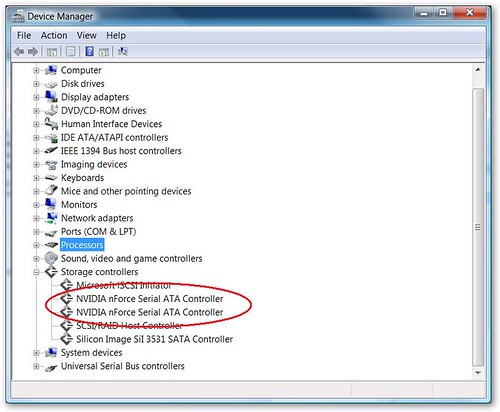
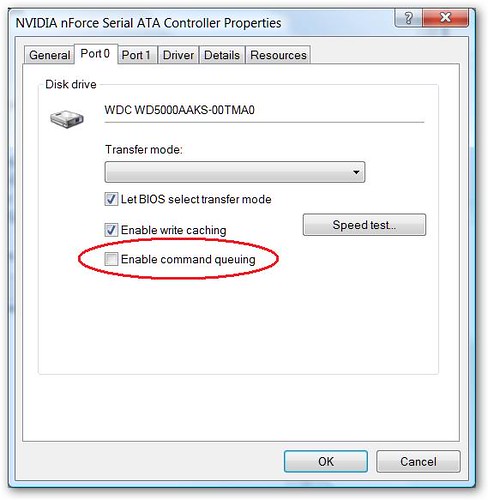
After building the new PC, I've been experiencing constant system freezes. Windows would freeze for about 30 seconds - all keys including CTRL+ALT+DEL or CTRL+SHIFT+ESC that usually switch to the appropriate utilities would work. 30 seconds later, the system would go back to its regular state, like nothing would happen. All actions that where queued up during the 30 second "freeze" would fire up. This was happing during performance intensive operations as well as when the computer was relatively free, on average around twice an hour.
After upgrading all drivers, motherboard BIOS and removing disconnecting all peripherals - I finally found a solution on Google that worked. Apparently - NVidia SATA drivers enable Command Queuing by default even though many drives do not support it. Disabling the option seem have fixed the problem. I've been "Freeze" free for 4 days now.
To see uncheck the option:
When reading emails in GMail, they are organized by conversation so related emails are easy to see. Follow the following steps to create the same view in outlook.
I wrote about creating an asynchronous ForEach method before. Apparently, there is a going to be a TPL (Task Parallel Library) available that will do the same type of functionality (and more I am sure)
Parallel.For(0, 100, delegate(int i) {
  a[i] = a[i]*a[i];
});
Recently, the Hard Drive on my old Dell Dimension 3000 died, and I've decided to upgrade. Seeing that Scott Hanselman just recently got a PC upgrade, and Jeff Atwood wrote a few great articles on building that PC, I've decided to build a PC as well.
Here are the specs with NewEgg links (I got everything from NewEgg)
| Mobo | MSI P6N SLI Platinum LGA 775 NVIDIA nForce 650i SLI ATX Intel Motherboard - Retail | $139.99 |
| CPU | Intel Core 2 Duo E6550 Conroe 2.33GHz LGA 775 Processor Model BX80557E6550 - Retail | $176.99 |
| Video | MSI NX8600GT-T2D256EZ GeForce 8600GT 256MB 128-bit GDDR3 PCI Express x16 SLI Supported Video Card - Retail | $109.99 |
| Hard Drive | Western Digital Caviar SE16 WD5000AAKS 500GB 7200 RPM SATA 3.0Gb/s Hard Drive - OEM | $109.99 |
| RAM | Patriot Extreme Performance 2GB (2 x 1GB) 240-Pin DDR2 SDRAM DDR2 800 (PC2 6400) Dual Channel Kit Desktop Memory Model PDC22G6400LLK - Retail | $111.99 |
| CPU Cooler | Scythe SCNJ-1100P 120mm Sleeve CPU Cooler - Retail | $34.99 |
| Case | RAIDMAX SMILODON ATX-612WBP Black SECC STEEL ATX Mid Tower Computer Case 500W Power Supply - Retail | $89.99 |
| Subtotal: | $773.93 | |
| Shipping: | $32.42 | |
| Grand Total | $806.35 |
Everything got delivered in 3 days.
The whole build took around 2 hours. I had a few minor hiccups - one is that I didn't expect the CPU cooler to be as big as it was. It really is a monster. After putting it on the mother board, I could not close the case since the heat-sink would hit the case power supply. I had to take CPU cooler off, close the side of the case with the mother board, and place the CPU cooler back.
The other hiccup was that the case came with a 4 pin power cord for CPU power. The motherboard had an 8 pin socket. However, after looking on the MSI website, I aw that you can use the 4 pin plug in one side of the socket.
Here are the final pics:
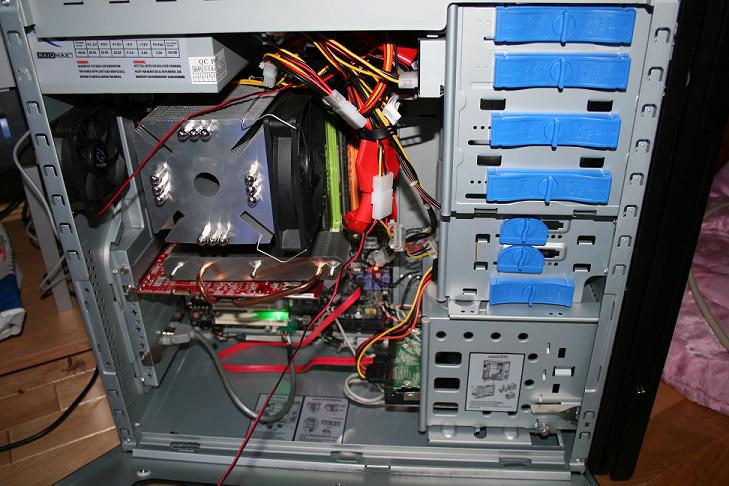

Overall, computer rocks. Fast, stable, looks cool :) The whole experience was pretty painless (if you follow the directions)
I am trying to use Firefox as my main browser, and one of the annoyances is that FireFox does not use NTLM authentication by default. Here are the steps to enable the NTLM authentication
That's all
Scott Hanselman updated his excellent tool list. For those who never saw it, I highly recommend to go through the list to see what they have been missing. For those who know about it, see what's new.
I've started working with Windows Workflow Rulesets to apply dynamically apply business rules to some internal processes. This involves using External RuleSet Toolset from Microsoft samples (some more on that in a later post)
One of the biggest peeves about the RuleSetDialog is its inability to resize. Viewing a complex rule in a three line window is very uncomfortable. It is, however, pretty easy to tweak the dialog and make it a lot more user friendly.
External RuleSet editor comes in source code. Open the code using Visual Studio, open the code for the RuleSetEditor form and find the editButton_Click event. What you'll may notice is that the RuleSetDialog class used derives from Dialog. Add a new function that will adjust the dialog to make it resizable.
private void TweakRuleSetDialogToResizable(RuleSetDialog ruleSetDialog)
        {
            ruleSetDialog.FormBorderStyle = FormBorderStyle.Sizable;
            ruleSetDialog.HelpButton = false;
            ruleSetDialog.MaximizeBox = true;
            ruleSetDialog.Controls["okCancelTableLayoutPanel"].Anchor = AnchorStyles.Right | AnchorStyles.Bottom;
            ruleSetDialog.Controls["rulesGroupBox"].Anchor = AnchorStyles.Left | AnchorStyles.Top | AnchorStyles.Right;
            ruleSetDialog.Controls["ruleGroupBox"].Anchor = AnchorStyles.Left | AnchorStyles.Top | AnchorStyles.Right | AnchorStyles.Bottom;
            ruleSetDialog.Controls["ruleGroupBox"].Controls["thenTextBox"].Anchor = AnchorStyles.Left |
                                                                                    AnchorStyles.Top |
                                                                                    AnchorStyles.Right | AnchorStyles.Bottom;
            ruleSetDialog.Controls["ruleGroupBox"].Controls["elseLabel"].Anchor = AnchorStyles.Left | AnchorStyles.Bottom;
            ruleSetDialog.Controls["ruleGroupBox"].Controls["elseTextBox"].Anchor = AnchorStyles.Left | AnchorStyles.Right | AnchorStyles.Bottom;
            ruleSetDialog.Controls["ruleGroupBox"].Controls["conditionTextBox"].Anchor = AnchorStyles.Left |
                                                                                         AnchorStyles.Top |
                                                                                         AnchorStyles.Right;

            ruleSetDialog.Controls["rulesGroupBox"].Controls["panel1"].Anchor = AnchorStyles.Left | AnchorStyles.Top | AnchorStyles.Right;
            ruleSetDialog.Controls["rulesGroupBox"].Controls["panel1"].Controls["chainingBehaviourComboBox"].Anchor = AnchorStyles.Top | AnchorStyles.Right;
            ruleSetDialog.Controls["rulesGroupBox"].Controls["panel1"].Controls["chainingLabel"].Anchor = AnchorStyles.Top | AnchorStyles.Right;
        }
Then call the function passing the RuleSetDialog before it is display from the editButton_Click event.
                    RuleSetDialog ruleSetDialog = new RuleSetDialog(selectedRuleSetData.Activity, null, selectedRuleSetData.RuleSet);

                    //Tweak the RuleSetDialog
                    TweakRuleSetDialogToResizable(ruleSetDialog);

                    DialogResult result = ruleSetDialog.ShowDialog();
I had the need to provide an enumerated value to in my code, and be able to easily convert the value to a string representation. .NET Enum can only be numeric and did not provide the functionality needed. A coworker showed me very nice way to create the same functionality with a simple class
//Using this instead of an ENum - beeing fancy
internal sealed class ActionType
{
    private readonly string _action;
    private ActionType(string action)
    {
        this._action = action;
    }

    public override string ToString()
    {
        return _action;
    }

    public static readonly ActionType Update = new ActionType("U");
    public static readonly ActionType Delete = new ActionType("D");
}
What the class allows me to do is the following:
main()
{
    ActionType action = ActionType.Update;

    action = ActionType.Delete;
    string sAction = action.ToString();
}
sAction will have "D" as the string representation for the Delete action.
Sometimes I download help files from the Internet, and on some machines, they would not display. I'd receive an IE error "The page cannot be displayed".
I finally decided to look into it. The solution is explained in the KB902225
The specific thing that worked for me was:
One of the biggest hurdles of the release process is to make sure you know exactly what you are releasing. To make that job a little easier, I've modified my project files to generate and include build related information in the assembly properties.
I am using a great open source project MSBuild Community Tasks.
Three of the tasks included are Time, Version and AssemblyInfo. Here's the process to incorporate them into the project.
Add a new project to the visual studio solution. I made this a C# project to make it easier to integrate with Visual Studio. Then open the project in your favorite text editor. Scroll down to the <Target Name="Build"> line. Now make the contents of the target the following
<Time Format="yyyy/MM/dd HH:mm:ss">
<Output TaskParameter="FormattedTime" PropertyName="buildDate" />
</Time>
<AssemblyInfo CodeLanguage="CS" OutputFile="GlobalInfo.cs"
AssemblyDescription="Build Date: $(buildDate)
Configuration: $(Configuration)$(Platform)" />
<Version VersionFile="version.txt">
<Output TaskParameter="Major" PropertyName="Major" />
<Output TaskParameter="Minor" PropertyName="Minor" />
<Output TaskParameter="Build" PropertyName="Build" />
<Output TaskParameter="Revision" PropertyName="Revision" />
</Version>
<AssemblyInfo CodeLanguage="CS" OutputFile="AssemblyVersion.cs" AssemblyVersion="$(Major).$(Minor).$(Build).$(Revision)" AssemblyFileVersion="$(Major).$(Minor).$(Build).$(Revision)" />
Now add a new text file to the project called version.txt and edit to have a single line "1.0.0.0"
That is almost it. After compiling the above project, you will receive two new files: GlobalInfo.cs and AssemblyVersion.cs. GlobalInfo.cs will contain the BuildDate and Configuration used during compilation. AssemblyVersion.cs will contain the version information based on the version.txt file. See help for AssemblyVersion task for how to make it increment the version number during the build.
Another task is to add the two new files as a replacement to the AssemblyInfo.cs that's usually a part of every solution. I do it with a text editor to make sure that they point to the file outside of the local project but rather to the newly generated files. That makes files read-only. The last task is to make sure that build dependency is properly set and the "GenerateVersion" project will be built first.
What you achieve after doing all of the above is that all compiled assemblies (.DLL and .EXE) will have a shared version number across multiple assemblies. They will also have in their properties tab information on when they where built and the configuration used during built. That can be used to troubleshoot and to easy production deployments.
I needed to create a simple dynamic parser to create a class based on an array of objects into a class. This would be used to read a data from a DatReader. My first thought was to use reflection but having a little bit of spare time, I decided to make a sample of doing this using CodeDOM.
My data class:
namespace CodeDomTest
{
    public class DataClass
    {
        private int _FirstInt;
        private long _SecondInt;
        private string _FirstString;
        private string _SecondString;

        public int FirstInt
        {
            get { return _FirstInt; } set { _FirstInt = value; }
        }

        public long  SecondInt
        {
            get { return _SecondInt; } set { _SecondInt = value; }
        }

        public string FirstString
        {
            get { return _FirstString; } set { _FirstString = value; }
        }

        public string SecondString
        {
            get { return _SecondString; } set { _SecondString = value; }
        }
    }
}
And the Interface that the parser would have to implement:
namespace CodeDomTest
{
    public interface IParser
    {
        DataClass Parse(object[] s);
    }
}
I started working backwards, and wrote a simple parser myself:
class StringParser : IParser
    {
        public DataClass Parse(object[] s)
        {
            DataClass _data = new DataClass();

            _data.FirstInt = System.Convert.ToInt32(s[0]);
            _data.FirstString = System.Convert.ToString(s[1]);
            _data.SecondInt = System.Convert.ToInt32(s[2]);
            _data.SecondString = System.Convert.ToString(s[3]);
            return _data;
        }
    }
Now, all I needed is for the CodeDom to generate the above code, and I am done. Easy...
using System;
using System.CodeDom;
using System.CodeDom.Compiler;
using System.Collections.Generic;
using System.IO;
using System.Reflection;
using System.Text;
using Microsoft.CSharp;

namespace CodeDomTest
{
    class DataParserGenerator
    {
        private static Dictionary<Type, IParser> ParserCache = new Dictionary<Type, IParser>();
        private static object SyncLock = new object();

        public static IParser GetCachedParser(Type ReturnType, string[] ParseMap)
        {
            lock (SyncLock)
            {
                if (ParserCache.ContainsKey(ReturnType))
                    return ParserCache[ReturnType];
            }
            IParser obj = GetParser(ReturnType, ParseMap);
            lock (SyncLock)
            {
                if (ParserCache.ContainsKey(ReturnType))
                    return ParserCache[ReturnType];
                ParserCache.Add(ReturnType, obj);
                return obj;
            }
        }

        public static IParser GetParser(Type ReturnType, string[] ParseMap)
        {
            CodeCompileUnit targetUnit;
            CodeTypeDeclaration targetClass;

            targetUnit = new CodeCompileUnit();
            CodeNamespace samples = new CodeNamespace(typeof(DataParserGenerator).Namespace.ToString());
            samples.Imports.Add(new CodeNamespaceImport("System"));
            targetClass = new CodeTypeDeclaration("Parser_Generated_" + ReturnType.Name);
            targetClass.IsClass = true;
            targetClass.TypeAttributes =
                TypeAttributes.Public | TypeAttributes.Sealed;
            targetClass.BaseTypes.Add(new CodeTypeReference(typeof (IParser)));
            samples.Types.Add(targetClass);
            targetUnit.Namespaces.Add(samples);

            AddParseMethod(targetClass, ReturnType, ParseMap);

            IParser obj = (IParser) ReturnCompiledClass(targetUnit, samples.Name + "." + targetClass.Name);
            return obj;
        }

        private static void AddParseMethod(CodeTypeDeclaration targetClass, Type ReturnType, string[] ParseMap)
        {
            CodeMemberMethod method = new CodeMemberMethod();
            method.Name = "Parse";
            method.Attributes = MemberAttributes.Public | MemberAttributes.Final;
            method.Parameters.Add(new CodeParameterDeclarationExpression(typeof(object[]), "param"));
            method.ReturnType = new CodeTypeReference(ReturnType);
            method.Statements.Add(
                new CodeVariableDeclarationStatement(ReturnType, "_data",
                                                     new CodeObjectCreateExpression(ReturnType)));

            for (int i = 0; i < ParseMap.Length; i++)
            {
                PropertyInfo prop;
                //Only support properties for now.
                prop = ReturnType.GetProperty(ParseMap[i]);
                if (prop == null)
                    continue;

                CodeArrayIndexerExpression mapIndexer = new CodeArrayIndexerExpression(
                    new CodeVariableReferenceExpression("param"),
                    new CodePrimitiveExpression(i));

                //If System.Convert has a conversion method, use it. Otherwise, just cast
                if (typeof(System.Convert).GetMethod("To" + prop.PropertyType.Name, new Type[] { typeof(object) }) != null)
                {
                    CodeTypeReferenceExpression ctr = new CodeTypeReferenceExpression(typeof(System.Convert));
                    CodeMethodInvokeExpression cme =
                        new CodeMethodInvokeExpression();
                    cme.Method = new CodeMethodReferenceExpression(ctr, "To" + ReturnType.GetProperty(ParseMap[i]).PropertyType.Name);
                    cme.Parameters.Add(mapIndexer);
                    method.Statements.Add(new CodeAssignStatement(
                                              new CodeVariableReferenceExpression("_data." + ParseMap[i]),
                                              cme
                                              ));
                }
                else
                {
                    method.Statements.Add(new CodeAssignStatement(
                                              new CodeVariableReferenceExpression("_data." + ParseMap[i]),
                                              new CodeCastExpression(prop.PropertyType,
                                                                     mapIndexer)));
                }
            }
            method.Statements.Add(new CodeMethodReturnStatement(new CodeArgumentReferenceExpression("_data")));
            targetClass.Members.Add(method);
        }

        private static object ReturnCompiledClass(CodeCompileUnit targetUnit, string targetClassName)
        {
            CSharpCodeProvider provider = new CSharpCodeProvider();

            // Build the parameters for source compilation.
            CompilerParameters cp = new CompilerParameters();

            // Generate a class library.
            cp.GenerateExecutable = false;

            // Do not save the assembly as a physical file.
            cp.GenerateInMemory = true;

            // Need to referenc current assembly because it containts definitions of IParse and DataClass
            cp.ReferencedAssemblies.Add(Assembly.GetExecutingAssembly().Location);

#if DEBUG
            StringBuilder sb = new StringBuilder();
            StringWriter sw = new StringWriter(sb);
            provider.GenerateCodeFromCompileUnit(targetUnit, sw, null);
            sw.Close();
            System.Diagnostics.Debug.WriteLine(sb.ToString());
#endif
            CompilerResults cr = provider.CompileAssemblyFromDom(cp, targetUnit);

            if (cr.Errors.Count == 0)
            {
                return cr.CompiledAssembly.CreateInstance(targetClassName);
            }
            else
                return null;
        }
    }
}
Here's a sample way of calling the parser:
            IParser dcParser;
            string[] s ={"1", "2", "3", "4"};
            string[] ParseMap = new string[] { "FirstInt", "FirstString", "SecondInt", "SecondString" };
            dcParser= DataParserGenerator.GetParser(typeof (DataClass), ParseMap);
            DataClass dc = dcParser.Parse(s);
And Here's the generated code (from the debug output window)
namespace CodeDomTest {
    using System;


    public sealed class Parser_Generated_DataClass : CodeDomTest.IParser {

        public CodeDomTest.DataClass Parse(object[] param) {
            CodeDomTest.DataClass _data = new CodeDomTest.DataClass();
            _data.FirstInt = System.Convert.ToInt32(param[0]);
            _data.FirstString = System.Convert.ToString(param[1]);
            _data.SecondInt = System.Convert.ToInt64(param[2]);
            _data.SecondString = System.Convert.ToString(param[3]);
            return _data;
        }
    }
}
That's all... I told you it's easy.