Label Cloud

Showing posts with label Hardware. Show all posts

Friday, April 03, 2009

Glad to have my IPhone back

My IPhone didn’t work this morning, so I wound up using a loaner Blackberry. Now… I’ve used a blackberry for over 5 years before my IPhone, and the interface didn’t change much. However, switching back was definitely an eye opener. Let’s just say I am glad my IPhone is back in business.

What I’ve learned:

Pro IPhone

  • I can type just as fast on the IPhone as I can on the blackberry. Since the IPhone “keys” are actually bigger, I even like IPhone typing more then blackberry typing.
  • I miss all the additional apps that I’ve installed on my IPhone. And they are not available on the blackberry

Pro Blackberry (I really wish IPhone had these)

  • Battery Life – It keeps going, and going, and going. Last time I charged it was 2 days ago. And it still has 2 out of 5 battery bars left
  • Blinking red light tells me I have new emails. I can see that from across the room.
  • EMail Shortcuts (T – Top / B – Bottom / U – Unread email)
  • Some additional email functionality – Mark all as read. Delete All Older EMail (from blackberry)
  • Quiet mode – The IPhone has only Sound and / Vibrate. Blackberry has multiple settings.
  • Brick Breaker – Spent 45 minutes playing it on the bus. I miss it.

At the end, I am glad that I have my IPhone back. Blackberry is a great business device, but a mediocre consumer accessory. I wish IPhone gets a better batter life and a few EMail / Calendar improvements.

Technorati Tags: ,,


Share/Save/Bookmark

Wednesday, January 07, 2009

Benefits and Hindrances of Regular Server Reboots

First of all, stackoverflow.com is very, very cool. I’ve talked about it before, and would like to reiterate the point. The site gets tremendous amount of traffic and is great for asking any development questions or starting technology related discussions.

Now to the main point.

Over the years that I’ve doing software development and architecture, I had a chance to work directly on server and data center architecture. One of the most important points of the software and hardware design was stability, which is generally measured in amount of uptime. We’ve spent a lot of time looking for memory and other resource leaks. Servers needed to be designed with the same resiliency in mind.

However, I’ve also worked with IT managers with extensive experience, who followed a different paradigm: Weekly, controlled reboots of all servers. I looked around and the policy is not at all uncommon:

I brought this question to Stack overflow for more comments, please check them out there.

http://stackoverflow.com/questions/410413/benefits-and-hindrances-of-regular-server-reboots

Some consider this a Foolish Policy, For Others, this is a weekly test that is good if you can afford it. Even though I definitely see benefits of testing startup scripts and resource cleanups, I would have to stand behind my original view: Reboots for the sake of rebooting are an overkill, adds downtime and waists resources personnel resources. Scheduled maintenance windows for server maintenance (hardware and software) and are a completely different story.


Share/Save/Bookmark

Monday, December 22, 2008

Rebuilding my PC – And thank you Mozy for the backup

I’ve finally rebuilt my PC. The installation Vista install was relatively painless, except for one minor snag. When I booted from the DVD Drive, and deleted my old partition, Vista refused to install with a message: “Windows is unable to find a system volume that meets it's criteria for installation.” Ohh Sh*t… Well a quick search on Google (using a laptop), provided a solution. Removing USB from the boot-up sequence in BIOS settings resolved this problem.

Before rebuilding the machine, I’ve spent a few hours backing up data from my desktop to DVDs. However, after reinstallation, I found out that I missed to backup my music collect. I don’t have that much, only 8 gigs or so, but it is still not something that I would want to miss. So here’s were Mozy comes in. I subscribe to Mozy’s online backup solution (http://www.mozy.com) For 4.95 a month, it provides a complete “Set it and Forget it” backup solution. After my machine was back up and running. I logged into the Mozy website. Selected “Restore using Web”, and chose my music folder. In about an hour, Mozy sent me an email notifying my that my restore files was ready. The email contained 3 links to file downloads: 3, 3, and 2GB files. About 1 hour for download, simple extract to the c:\ and I am back having my full music collection restored.

Mozy provides a pretty neat interface, very simple, yet pretty powerful. Ability to create multiple backup sets, bandwidth throttling, explorer integration (for Backup and Restore functions). Professional version provides even more functionality. And if all that didn’t get you excited, guess this: All that functionality is available FREE for up to 2GB of space. Yep. Completely Free. So check it it out: http://www.mozy.com

Technorati Tags: ,,,


Share/Save/Bookmark

Thursday, November 29, 2007

Google Maps for Mobile - Impressions Day 2

I just took a 60 mile trip and was checking My Location on the Google Maps for Mobile. To my surprise, it was pretty accurate during the whole trip. The map would place me on the highway or within a 50 yards of the highway along the route.

Another interesting detail, I didn't have to request the location all the time, the position would adjust as the car was moving - very much like the it does on the GPS.

That brought an interesting thought - Now Google has not only the locations where their devices are being used, but the movement patterns as well. That's a lot of information that can be used for both good and not ...

Technorati Tags: , , ,


Share/Save/Bookmark

Wednesday, November 28, 2007

Google Maps for Mobile - now with My Location

Today, Google made a new Google Maps for Mobile available on their site. The new beta version includes a My Location functionality that places your location on the map based on the information received from the cell phone towers.

I've installed the app on my Blackberry Curve. The My Location function is great, even though it is not as good as a GPS. While in my office, Google Maps placed my location within around 100m of my real location. That was great. The neat trick is that positioning works even when you are inside a building, something that GPS can not do.

However, near my house, it around 1 mile off (1.5 Km). Still good, considering makes it easier to request directions since its a lot easier to select the source point on the map.

I am sure they will be improving the app as time goes on as well.

Get the application from http://www.google.com/gmm

Technorati Tags: , , ,


Share/Save/Bookmark

Monday, September 17, 2007

System freeze and SATA Command Queuing

After building the new PC, I've been experiencing constant system freezes. Windows would freeze for about 30 seconds - all keys including CTRL+ALT+DEL or CTRL+SHIFT+ESC that usually switch to the appropriate utilities would work. 30 seconds later, the system would go back to its regular state, like nothing would happen. All actions that where queued up during the 30 second "freeze" would fire up. This was happing during performance intensive operations as well as when the computer was relatively free, on average around twice an hour.

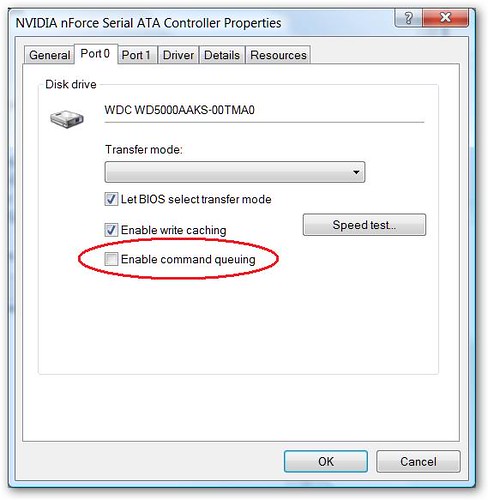
After upgrading all drivers, motherboard BIOS and removing disconnecting all peripherals - I finally found a solution on Google that worked. Apparently - NVidia SATA drivers enable Command Queuing by default even though many drives do not support it. Disabling the option seem have fixed the problem. I've been "Freeze" free for 4 days now.

To see uncheck the option:

  • Right click on computer, select "Properties
  • Select "Device Manager"
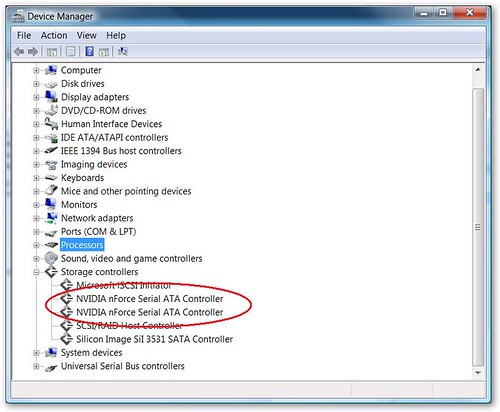
  • Find "Storage Controllers"
  • For each "NVIDIA nForce Serial ATA Controller" select Properties, and uncheck "Enable Command Queuing" option

DeviceManager

SATA


Share/Save/Bookmark

Wednesday, September 12, 2007

Building a new PC

Recently, the Hard Drive on my old Dell Dimension 3000 died, and I've decided to upgrade. Seeing that Scott Hanselman just recently got a PC upgrade, and Jeff Atwood wrote a few great articles on building that PC, I've decided to build a PC as well.

Here are the specs with NewEgg links (I got everything from NewEgg)


Mobo

MSI P6N SLI Platinum LGA 775 NVIDIA nForce 650i SLI ATX Intel Motherboard - Retail
Item #: N82E16813130081

$139.99
CPU

Intel Core 2 Duo E6550 Conroe 2.33GHz LGA 775 Processor Model BX80557E6550 - Retail
Item #: N82E16819115030

$176.99
Video

MSI NX8600GT-T2D256EZ GeForce 8600GT 256MB 128-bit GDDR3 PCI Express x16 SLI Supported Video Card - Retail
Item #: N82E16814127293

$109.99
Hard Drive

Western Digital Caviar SE16 WD5000AAKS 500GB 7200 RPM SATA 3.0Gb/s Hard Drive - OEM
Item #: N82E16822136073

$109.99
RAM

Patriot Extreme Performance 2GB (2 x 1GB) 240-Pin DDR2 SDRAM DDR2 800 (PC2 6400) Dual Channel Kit Desktop Memory Model PDC22G6400LLK - Retail
Item #: N82E16820220144

$111.99
CPU Cooler

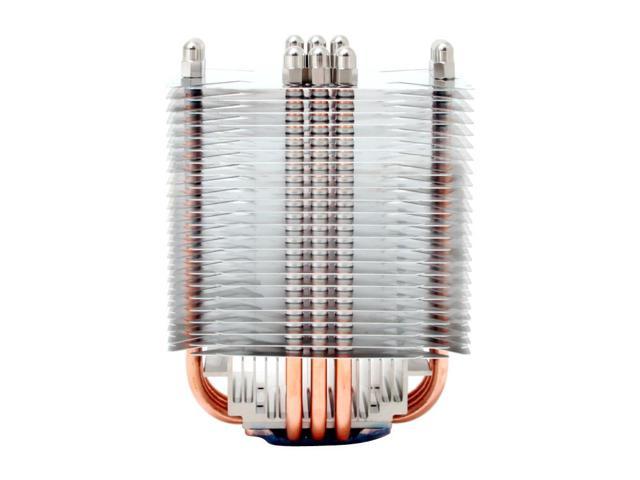
Scythe SCNJ-1100P 120mm Sleeve CPU Cooler - Retail
Item #: N82E16835185038

$34.99
Case

RAIDMAX SMILODON ATX-612WBP Black SECC STEEL ATX Mid Tower Computer Case 500W Power Supply - Retail
Item #: N82E16811156062

$89.99
 

Subtotal:

$773.93


Shipping:

$32.42


Grand Total

$806.35

Everything got delivered in 3 days.

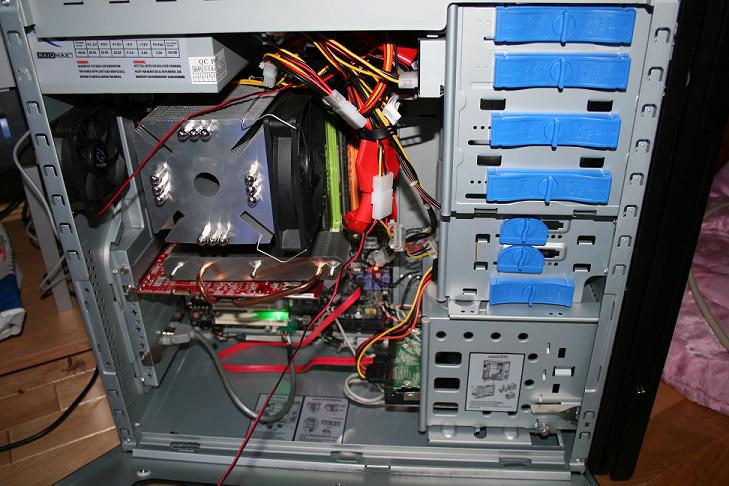
The whole build took around 2 hours. I had a few minor hiccups - one is that I didn't expect the CPU cooler to be as big as it was. It really is a monster. After putting it on the mother board, I could not close the case since the heat-sink would hit the case power supply. I had to take CPU cooler off, close the side of the case with the mother board, and place the CPU cooler back.

The other hiccup was that the case came with a 4 pin power cord for CPU power. The motherboard had an 8 pin socket. However, after looking on the MSI website, I aw that you can use the 4 pin plug in one side of the socket.

Here are the final pics:

IMG_0998

 IMG_1005


Overall, computer rocks. Fast, stable, looks cool :) The whole experience was pretty painless (if you follow the directions)


Share/Save/Bookmark
Directory of Computers/Tech Blogs